ApplicationsDownloadsContact
All downloads
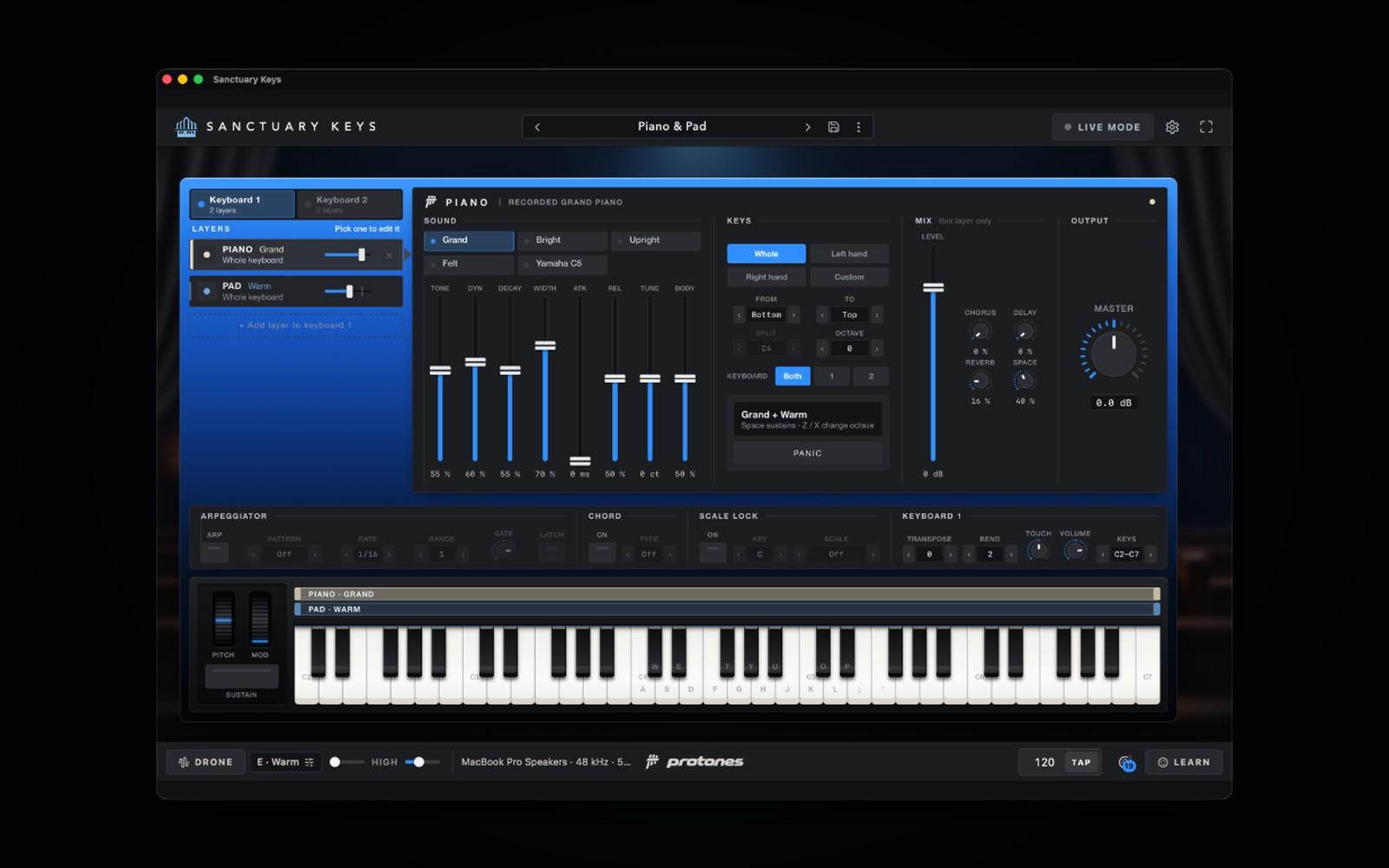
Sanctuary Keys screenshot
v0.1.8Latest · Nov 13, 2026

Sanctuary Keys

A stage keyboard built for worship: grand piano, electric piano, organ, pads, synths and brass, layered or split, as an app and a plugin.

macOS:
macOS 11 or later · Apple silicon & Intel
Windows:
Windows 10 (version 1809) or later · 64-bit

What's new in v0.1.8

  • NewA recorded Steinway D concert grand (the bitKlavier Grand by Princeton University) as the Grand, with eight strengths of strike for every note.
  • NewDrones under everything for worship: a warm pad and a higher one an octave up, each with its own volume, one switch for both, and a popup for key, chord, brightness, movement, reverb and fade. Each song in Live mode keeps its own drone settings.
  • NewDrum pads, with MIDI learn for pads that send notes, program changes or CCs, such as the SINCO SMK25's pads on channel 10.
  • NewA second keyboard is listened to on all of its MIDI ports, so its keys and pads both play.
  • ImprovedA cleaner, studio-style panel with thin outlines, readable highlighted buttons, the metallic blue body (violet for keyboard 2), shorter keys to leave room for the controls, and space around the instrument.
  • FixedLetting go of a key on the pianos no longer plays an extra thump or ring.
  • ImprovedThe drone always starts off when the app opens.
Release history(3 earlier versions)
  1. v0.1.7Nov 7, 2026
    • FixedOn smaller or scaled Windows screens the window now fits, so its title bar with the close and maximize buttons stays on screen.
    • ImprovedSanctuary Keys opens at 1280 x 800, a size most screens have room for. Drag the corner to make it bigger.
  2. v0.1.5Nov 3, 2026
    • NewEight sound controls per layer, as faders: piano attack, release, tune and body; e-piano bell, tremolo rate, release and width; organ drive, key click, percussion decay and release; pad resonance, detune, sub and width; synth attack, release, detune and drive; brass attack, scoop, vibrato and width.
    • NewGet a free key: the Pro button opens a form that emails you a key that unlocks Pro.
    • ImprovedBigger lyrics in Live mode, with compact section keys along the bottom.
    • ImprovedThe display, output and panic now sit in the Keys section, and the layer list scrolls when you add a lot of layers.
    • ImprovedPressed keys light up gray, and faders no longer shift as their values change.
  3. v0.1.3Nov 3, 2026

    First release

    • NewFirst release of Sanctuary Keys, a worship stage keyboard for Mac and Windows, as a standalone app and VST3 and AU plugins.
    • NewA recorded grand piano, electric piano, organ, pads, synths and brass, layered or split across the keyboard, each with its own effects and level fader.
    • NewLive mode, with a setlist, each song's lyrics and chords, auto-scroll and five Sections per song.
    • NewArpeggiator, chords, scale lock, sustain pedal, pitch and mod wheels, and MIDI learn.

Overview

What is Sanctuary Keys?

Sanctuary Keys turns any MIDI keyboard into a worship stage keyboard. It starts as a recorded grand piano, and you can add pads, organ, electric piano, synths or brass on top, across the whole keyboard or split to the left or right hand, each with its own level and its own reverb, delay and chorus.

Play it as an app on its own, or load it as a VST3 or Audio Unit instrument in Logic, MainStage, Ableton Live, Reaper, Cubase, Studio One and other DAWs. Live mode keeps your setlist on screen, with each song's lyrics and chords large in the middle and five Sections per song to switch sounds as you play.

Features

What you can do with it

A recorded grand piano

A Steinway D concert grand recorded note by note at eight strengths, and a Yamaha C5, with Bright, Upright and Felt voicings, plus tone, dynamics, decay and width controls.

Drones and drum pads

A warm drone and a higher one an octave up under your playing, set per song in Live mode, and drum pads you can MIDI learn to your keyboard's pads.

Layers for worship

Electric piano, organ, pads, synths and full brass, layered over the piano or split across the keyboard, each with its own effects.

Live mode with lyrics and chords

A setlist down the left, each song's lyrics with chords floating over the words, auto-scroll at your speed, and five Sections per song.

Arpeggiator, chords and scale lock

An arpeggiator, one-finger chords and a scale lock that keeps every note in the song's key.

Made for your keyboard

Velocity, sustain pedal, pitch and mod wheels, transpose and octave shifts, and MIDI learn for any knob or fader. No keyboard? Play from your computer's keys.

App and plugin

Play through the standalone app, or use the VST3 and Audio Unit plugins in your DAW. Supports ASIO interfaces on Windows for low latency.

How it works

Get started in 4 steps

  1. 1

    Download the installer for your Mac or Windows PC and open it to install the Sanctuary Keys app and plugins.

  2. 2

    Connect your MIDI keyboard and open Sanctuary Keys.

  3. 3

    Pick your audio output and MIDI keyboard in Settings → Audio.

  4. 4

    Play the grand piano, then add a layer such as a pad, or load Sanctuary Keys as an instrument in your DAW.

FAQ

Frequently asked questions

Is Sanctuary Keys free?

Yes. Every sound, the grand piano, electric pianos, organ, pads, synths and brass, plays free with its own effects, one of each, with no time limit. Pro adds a second layer of any sound, like two pads over different keys.

Do I need a MIDI keyboard?

A MIDI keyboard gives you velocity, sustain and wheels, but you can also play Sanctuary Keys from your computer's keyboard.

Which DAWs does it work with?

Any DAW that loads VST3 or Audio Unit instruments, including Logic Pro, GarageBand, MainStage, Ableton Live, Reaper, Cubase, Studio One and FL Studio.

Why does Windows say "Windows protected your PC" when I install it?

Windows shows this for new apps it hasn't seen many downloads of yet. Click More info, then Run anyway to install Sanctuary Keys.

Follow Pro Tones on Facebook

Sanctuary Keys updates, new releases, tips and tone demos.

Follow us