ApplicationsDownloadsContact
All downloads
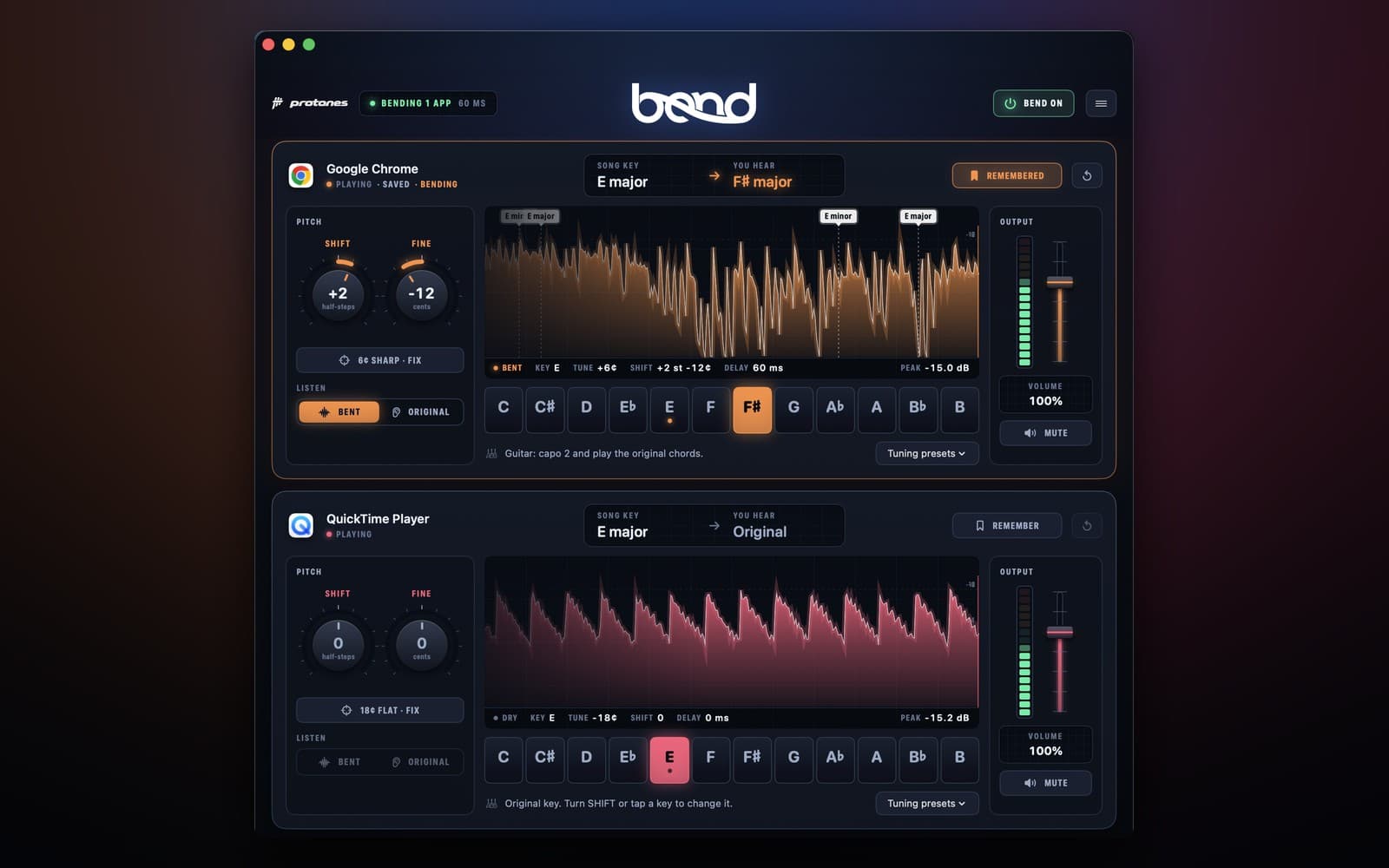
ProTones Bend screenshot
v1.1.1Latest · Nov 2, 2026

ProTones Bend

Play along in any key. Bend changes the key of any app's audio, live.

macOS:
macOS 14.2 or later · Apple silicon & Intel
Windows:
Windows 10 (version 2004) or later · x64 & ARM

What's new in v1.1.1

  • ImprovedBend can share anonymous usage stats (how long you bend, which apps and how far, and your country) so we know what to improve. Nothing identifies you, and you can turn it off with Share Anonymous Usage Stats in the menu.
  • FixedOn Mac, labels on the segment buttons no longer get cut off when the window is narrow.
Release history(2 earlier versions)
  1. v1.1.0Oct 28, 2026

    A studio-style redesign

    • NewProTones Bend is now available for Windows 10 and 11, on Intel/AMD and ARM PCs.
    • NewA studio-plugin redesign with Shift and Fine knobs, an LED level meter and a volume fader for each app.
    • NewA live waveform of each app's audio, with tags showing where the song's key was found and where you changed it.
    • NewA Fine knob to tune any app up or down in cents.
    • ImprovedBigger, easier-to-tap key buttons.
    • ImprovedEach app gets its own colour (orange first, then pink-red) across its knobs, waveform and keys.
    • ImprovedThe Remember button now clearly shows when an app's settings are saved.
    • ImprovedA menu in the top bar for Check for Updates, Sound Settings and About.
  2. v1.0.0Oct 25, 2026

    Initial release

    • NewChange the key of any app's audio live, in Spotify, YouTube, Apple Music and more.
    • NewBend detects each song's key, and one tap on "Play it in" switches it to the key you want, with a capo hint for guitarists.
    • NewFix pitch corrects recordings that aren't tuned to A440.
    • NewHold to hear the original for an instant before/after comparison.
    • NewTuning shortcuts for guitars and recordings tuned a half or whole step down.
    • NewA separate volume for each app, up to 150%.
    • NewGet notified when a new version is available.

Overview

What is ProTones Bend?

ProTones Bend changes the key of any app's audio on your Mac or Windows PC, live. Play a song in Spotify, YouTube, Apple Music, a browser or a video player, and Bend moves it to the key you want to play or sing in, without changing the speed.

Bend detects each song's key automatically. Tap the key you want under "Play it in" and the song shifts there, with hints for guitarists like which capo position to use or how far to tune down. Every app gets its own controls, so you can bend a YouTube lesson and a backing track separately.

Features

What you can do with it

Change the key of any app

Shift Spotify, YouTube, Apple Music, QuickTime, VLC or any other app up or down in half-steps, each with its own settings.

Automatic key detection

Bend listens to each song and shows its key, so you can jump straight to the key you want instead of counting half-steps.

Capo and tuning hints

See which capo position lets you play the original chords, or how far to tune down to match the new key.

Fix recordings that aren't A440

Older and live recordings are often slightly sharp or flat. One click tunes them back to A440 so they match your instrument.

Tuning shortcuts

Hear songs recorded a half step down (E♭) or a whole step down (D) in standard tuning, without retuning your guitar.

Hold to hear the original

Press and hold to hear the song without Bend for an instant before-and-after comparison.

Per-app volume up to 150%

Balance a quiet video against your music with a separate volume control for each app.

Low delay or best quality

Use low delay for browsers and video players so audio stays in sync with the picture, and best quality for music apps. Auto picks for you.

Private by design

Bend only processes sound as it plays. Nothing is recorded or saved.

How it works

Get started in 4 steps

  1. 1

    Download the installer for your Mac or Windows PC and open it to install ProTones Bend.

  2. 2

    Open Bend. On a Mac, allow System Audio Recording Only in Privacy & Security, so it can hear other apps' audio.

  3. 3

    Play a song in Spotify, YouTube or any app. It appears in Bend and its key is detected.

  4. 4

    Pick the key you want under "Play it in", or use the half-step buttons, and play along.

FAQ

Frequently asked questions

Is ProTones Bend free?

Yes. ProTones Bend is a free download for macOS and Windows.

Which apps does Bend work with?

Any app that plays audio on your computer, including Spotify, Apple Music, YouTube and other sites in your browser, QuickTime Player, VLC and Windows Media Player.

Does changing the key change the speed?

No. Bend changes only the pitch, so the song keeps its original tempo.

Why does Bend need System Audio Recording permission?

macOS requires this permission for any app to hear other apps' audio. Bend only asks for System Audio Recording Only, uses it to change the sound as it plays, and never records or saves anything.

Why does it need macOS 14.2 or later?

Bend uses the per-app audio capture that Apple added in macOS 14.2. It runs on both Apple silicon and Intel Macs.

Is there a Windows version?

Yes. ProTones Bend runs on Windows 10 (version 2004 or later) and Windows 11, on both Intel/AMD and ARM PCs.

Why does Windows say "Windows protected your PC" when I install it?

Windows shows this for new apps it hasn't seen many downloads of yet. Click More info, then Run anyway to install ProTones Bend.

Does Bend collect any data?

Only anonymous usage stats, and you can turn them off with Share Anonymous Usage Stats in Bend's menu. When Bend quits, it reports how long it was open and bending, which apps were bent and by how many semitones, and your country from your computer's region setting. Nothing identifies you or your computer: there's no name, email or account, and a new random ID is used every time Bend opens.

Follow Pro Tones on Facebook

ProTones Bend updates, new releases, tips and tone demos.

Follow us